BMW Oil Reset, iDrive, and Key Fob: Complete DIY Guide
You can reset the BMW oil service light through the iDrive menu or cluster buttons depending on your model year, and most key fob batteries swap in under two minutes. This guide covers the exact steps for every iDrive generation, how to check oil level electronically, key fob battery replacement for all three key types, iDrive infotainment resets, and a quick reference for common dashboard warning lights.
What You’ll Need Before Starting
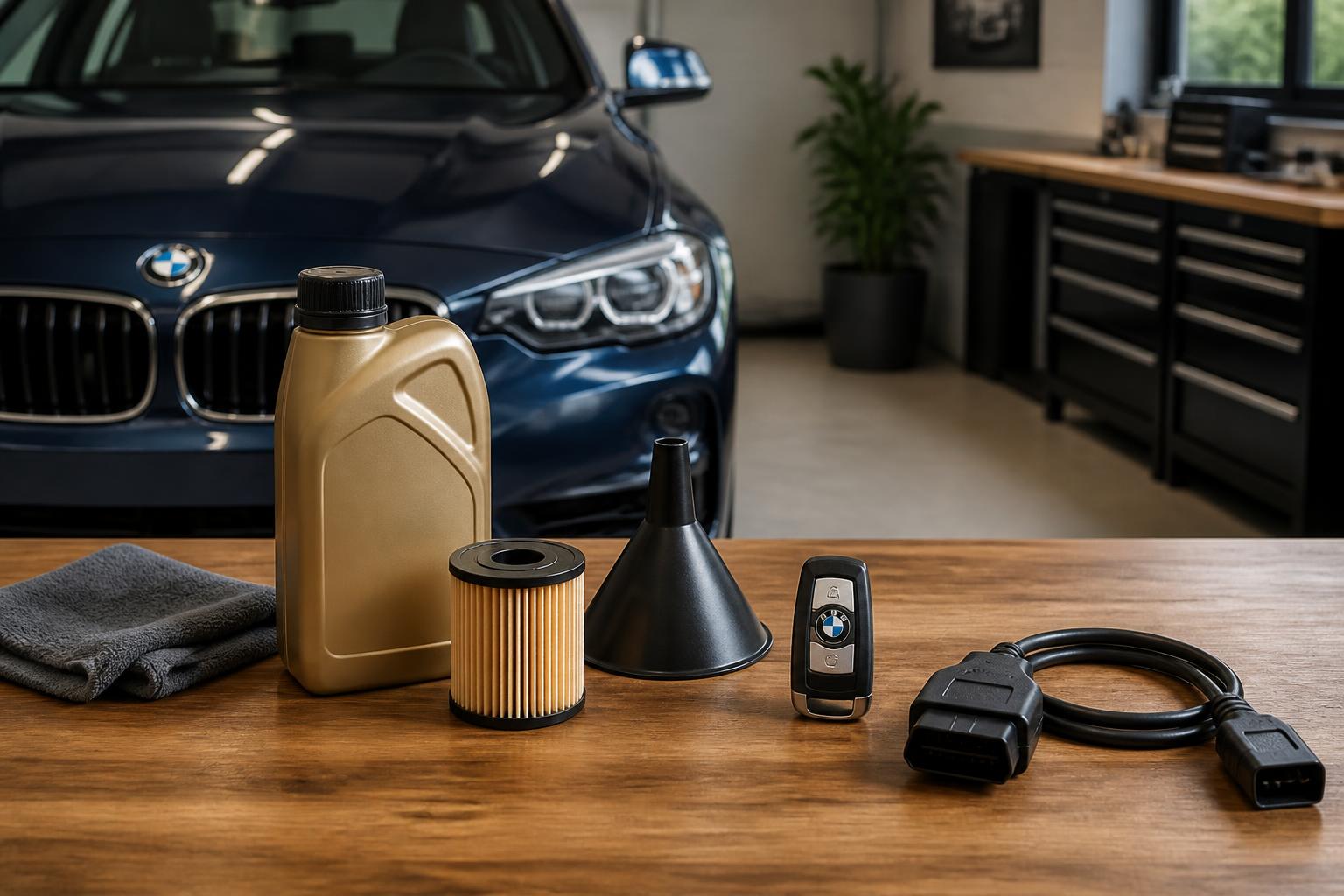
- For oil reset: Ignition access (key or fob inserted), vehicle at rest, engine off
- For key fob battery: Replacement battery (CR2032 or CR2450 – check your key type), small flathead screwdriver or the emergency key itself
- For iDrive reset: Nothing extra – just the volume/power knob
- For warning light diagnosis: OBD2 scanner (optional but recommended for check engine lights)
Have these on hand before you start so you’re not hunting for tools mid-procedure.
Resetting the BMW Oil Service Light
The oil service reset procedure changes with each iDrive generation. Find your system below. After each reset, verify the service light is off by cycling the ignition off and back on – the yellow oil icon should disappear and the iDrive service menu should show “OK” or a full green bar.
Pre‑iDrive Models (E46, E39, E83, early E90)
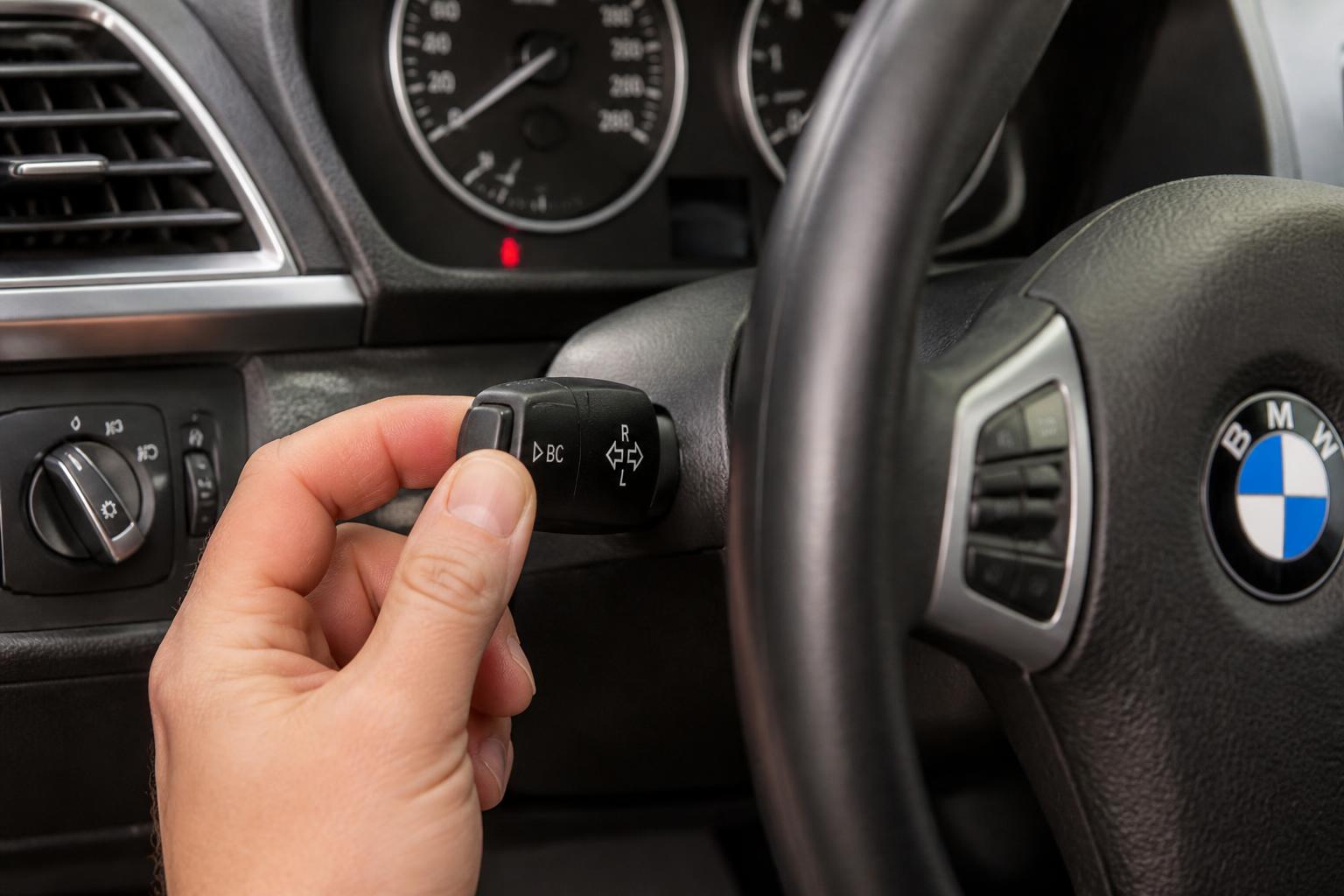
Models without a central screen use the instrument cluster button.
1. Turn the ignition to position 2 (accessories on, engine off). Do not start the engine.
2. Press and hold the trip odometer reset button (left side of cluster) until the service indicator appears in the display.
3. Release the button, then press again briefly until “Oil Service” blinks.
4. Press and hold the button again for about 5 seconds – “Reset?” appears on the display.
5. Release, then press and hold once more to confirm. The display shows “OK” when complete.
Success check: Turn the ignition off, then back to position 2. The service reminder should no longer appear on startup. If it does, the reset did not take – repeat the steps exactly, holding each press for the full duration.
When to escalate: If the cluster shows “Reset?” but never confirms with “OK,” the instrument cluster module may have a fault. A dealer or BMW specialist can force the reset with diagnostic software (ISTA or similar). This is rare but happens on early E46 models with failing cluster capacitors.
Example: On a 2005 BMW 325i (E46), the reset works only with the engine not running but key in position 2. If you have an automatic transmission, confirm the gear selector is in Park.
iDrive CIC (2008 – 2012 models)
Found in 3 Series (E90 LCI), 5 Series (E60 LCI, F10 early), X3 (E83 LCI), X5 (E70).
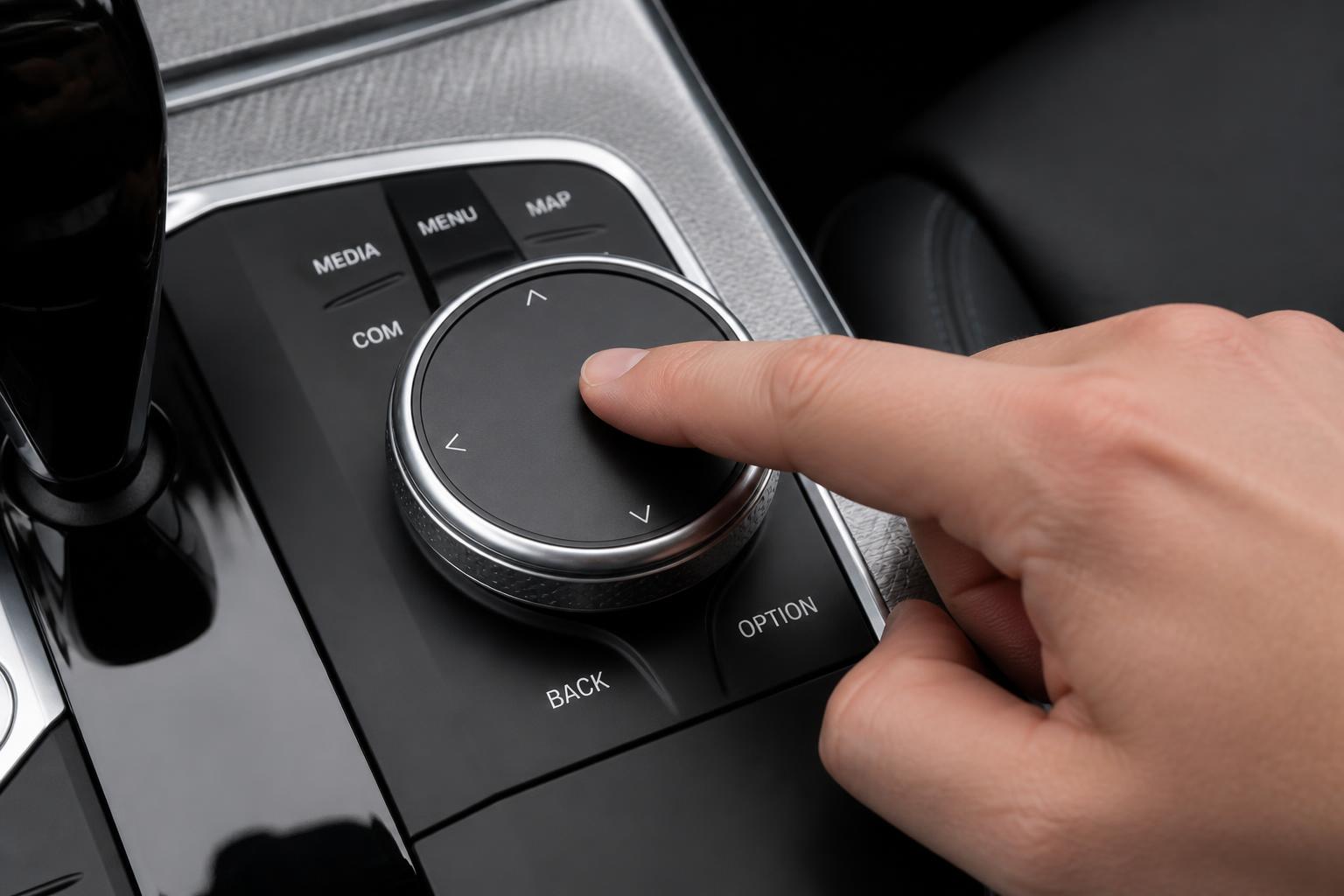
1. Press the iDrive button, go to Vehicle Info → Vehicle Status.
2. Select Service Required.
3. Highlight Oil Service and press the controller.
4. Select Reset and confirm. The countdown screen shows remaining miles or days.
Success check: After confirmation, the display should show a full green bar and read “OK” or list the remaining miles. If it still shows “0 miles” or “overdue,” the reset did not register.
When to escalate: On CIC systems, the reset option is only available when the oil service is actually due (not fully green). If the option is grayed out, your service interval is still active – the reset is not needed. If the system says “Reset” but the countdown returns to 0 immediately after restart, the CBS (Condition Based Service) data module may have a fault requiring dealer reprogramming.
Example: On a 2011 BMW 328i with CIC, attempting to reset before the service is due will show “Reset” as an option but the system will refuse it. This is normal behavior – wait until the service indicator shows the service is due.
iDrive NBT (2013 – 2016 models)
Found in F30 3 Series, F10 LCI, F25 X3, F15 X5, F32 4 Series.
1. My Vehicle → Vehicle Status → Service Required.
2. Scroll to Engine Oil and select Reset or Reset oil change interval.
3. Confirm with Yes. A progress bar fills, then the display returns to the service menu.
Success check: The progress bar should fill completely (about 5 seconds). If it stops partway or returns an error, the reset failed. Return to the service menu and verify the oil service counter now shows “OK” or the new interval.
When to escalate: If the progress bar fills but the service reminder returns within a few ignition cycles, the CBS module may be corrupted. A BMW scan tool can rewrite the module. This is uncommon but can happen after battery disconnection or module updates.
Example: On a 2014 BMW 535i, the reset prompt appears only when the counter reaches 0 miles or the service is overdue. If you reset a non-due service, the system will show the reset option but may not actually change the counter.
iDrive 6.0 (2017 – 2019 models)
Found in G30 5 Series, G01 X3, G12 7 Series, most LCI F30 and F80 M3.
1. My Vehicle → Vehicle Status → Service Required.
2. Tap Oil Service → Reset.
3. The system asks for confirmation – select Reset again. A checkmark appears when done.
Success check: The checkmark icon confirms the reset. Turn the ignition off, then back on, and verify the service reminder no longer appears. The iDrive service menu should show “Oil Service OK” with a green bar.
When to escalate: If the checkmark appears but the reminder returns later, the vehicle may need a software update (iDrive firmware). This is known on early iDrive 6.0 builds from 2017. A dealer update typically resolves it.
Example: On a 2018 330i, you can reset even if the oil level is full; the reset only clears the service reminder, not the electronic oil level reading. A full oil level bar and a cleared service reminder are two separate things.
iDrive 7.0 (2019+ models)
Found in G20 3 Series, G05 X5, G06 X6, G22 4 Series, G80 M3.
1. My Vehicle → Vehicle Status → Service Required.
2. Tap the Engine Oil tile.
3. Scroll to Oil Service and tap Reset Service Interval.
4. Confirm with Reset. The display briefly shows “Service data reset.”
Success check: After confirmation, the tile should show “Oil Service OK” with a green check. Cycle the ignition off and on to confirm no reminder appears on startup. If the tile still shows “Service due” in yellow or red, repeat the process.
When to escalate: On iDrive 7.0, a network communication error between the head unit and the CBS module can cause the reset to fail silently. If the reset accepts your input but the counter doesn’t change, have the car scanned with ISTA. This sometimes requires a gateway software update.
Example: On a 2020 X5 xDrive40i, the oil reset is grouped under “Condition Based Service”; you may need to scroll past brake fluid and microfilter items to reach it. If you reset the wrong item, you can clear the error by running the correct service reset later.
M Models (any iDrive version)
M cars with dedicated M-menu buttons (e.g., M3, M4, M5, M6, X3M, X4M, X5M, X6M) also offer a reset through the M Setup shortcut.
1. Press the M button on the steering wheel, then select M Setup → Service → Oil Service → Reset.
2. Alternatively, follow the standard iDrive path above.
Success check: Same as the iDrive version for your model year. Verify the service reminder is clear after restarting the car.
On a 2017 M2 (NBT EVO), the oil reset path is identical to non-M cars with iDrive 6.0. The M Setup shortcut offers no advantage – use whichever menu is faster for you.
Checking Oil Level Electronically
All modern BMWs with an electronic dipstick (most models after 2010) display oil level in the iDrive menu. This is not a substitute for a physical dipstick check on models that still have one, but it’s the only method on cars with electronic-only monitoring.
Access the Oil Level Screen
- iDrive 6.0 / 7.0: My Vehicle → Vehicle Status → Engine Oil Level.
- CIC / NBT: Vehicle Info → Vehicle Status → Engine Oil Level.
- For models with a dedicated Oil Level button on the stalk (e.g., some E9x), press the button and scroll with the switch.
The level is shown as a bar graph: full to low. A message reading “Engine oil level OK” appears when normal.
Conditions for an Accurate Reading
- Engine must be at operating temperature (driven for at least 10 minutes). A cold engine will show a lower reading.
- Vehicle must be on level ground. A slope will give a false low or false high reading.
- On some models, the measurement takes about 30 seconds to update after selecting the menu.
- If the display shows “Measuring – drive a short distance,” you need to take a short drive. For example, a 2015 X5 35i (N55) requires about 5 miles of mixed driving before it provides a reading. Stop-and-go city driving works; highway cruising does not always trigger the measurement.
Success check: The bar graph should display between the min and max marks. “Engine oil level OK” is the normal message. If it shows “Low” or “Minimum,” add oil (use the correct BMW LL-01 or LL-04 spec) and recheck after driving again.
When to escalate: If the oil level reading bounces between full and low within the same drive cycle (unstable), the electronic oil level sensor may be failing. This is a known issue on N52 and N54 engines (2006–2012). Replacement requires dropping the oil pan – a shop job.
BMW Key Fob Battery Replacement
BMW uses three main key styles. Battery types vary. After replacing the battery, test the fob by walking up to the car and pressing the unlock button. The car should respond immediately. If it doesn’t, the battery may be installed upside down or the key may need resyncing.
Diamond Key (Non‑Display, 2006 – 2012)
Thin credit‑card style with metallic backing. Uses a CR2032 battery.
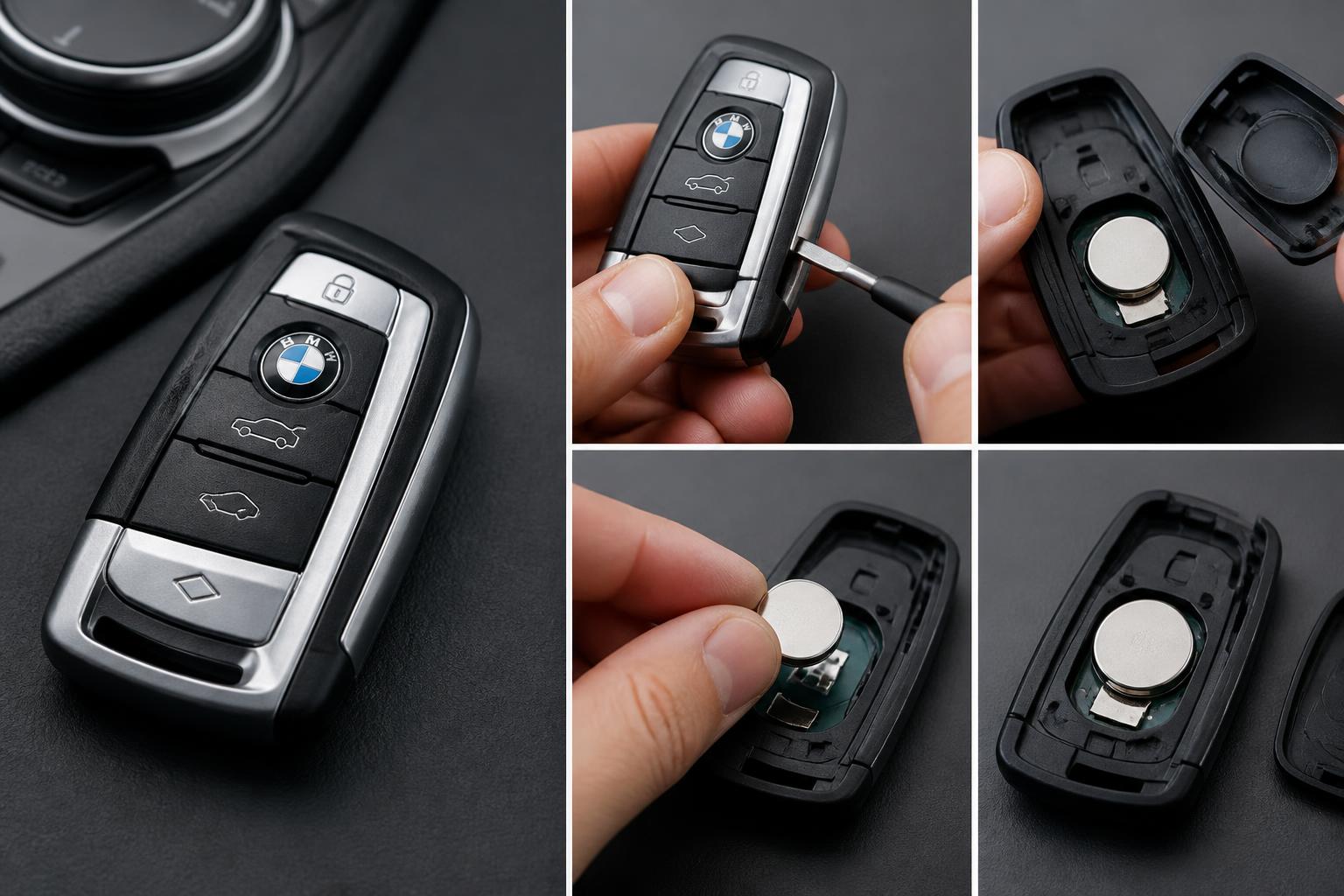
1. Slide the metal key release switch on the side. The emergency key pops out.
2. Insert the emergency key into the slot near the release switch and twist gently to separate the two halves. There’s a small lip – work your way around.
3. Remove the old battery (CR2032, 3V) from its clip. Note the orientation (+ side facing up).
4. Insert the new battery with the + side facing up.
5. Snap the halves back together and reinsert the emergency key.
Success check: Press the lock or unlock button. The LED on the fob should flash. If it doesn’t, the battery is likely upside down or the fob halves are not fully seated.
When to escalate: If the fob still doesn’t work after a fresh battery, the fob’s internal circuit board may have cracked solder joints – a common issue on diamond keys from 2008–2010. Replacement fobs are available from BMW; used ones cannot be reprogrammed to a different car by the owner.
Example: 2007 335i diamond key – if the battery is dead, the car still starts via the emergency key and the start button will detect the fob if placed against the steering column. This is a backup method, not a permanent fix.
Display Key (2013 – Present, e.g., i8, G11 7 Series, G15 8 Series, G05 X5, G20 3 Series)
Rectangular key with a small LCD screen. Uses a CR2450 battery.
1. Press the release button on the side and remove the mechanical key.
2. Insert the mechanical key into the groove at the top and pry the back cover off. Apply steady pressure – the clip is tight.
3. Remove the old battery (CR2450, 3V). It is held in by a clip. Pry gently with a small flathead if needed.
4. Insert the new battery with the + facing up.
5. Reattach the back cover and insert the mechanical key.
Success check: The display screen should turn on and show the BMW logo within 5 seconds. If the screen stays black, the battery may be installed upside down or the fob needs resyncing.
Note: The display key must be re-synced after battery replacement on some models. To resync, place the key in the center console tray (where the wireless charging pad is) and press the start button. The screen should turn on within 10 seconds. If it doesn’t, hold the key directly against the tray surface for 15 seconds.
When to escalate: If the display key fails to resync after three attempts, the key’s internal battery management module may have failed. Display keys are expensive ($400–$600 replacement). A dealer can test the key and sync it with diagnostic tools before you order a new one.
Comfort Access Key (Rectangular with Metal Key, 2008 – Present)
Standard key fob for most 1–7 Series and X models after 2008. Uses a CR2032 or CR2450 battery (check your key).
1. Slide the release button to eject the metal emergency key.
2. Insert the emergency key into the slot on the back of the fob and twist (or use a small flathead screwdriver) to pry the back cover off.
3. Remove the old battery. Note the type – if the battery is round and flat, it’s CR2032; if thicker, it may be CR2450.
4. Insert the new battery with the + side up.
5. Snap the back cover on and reinsert the emergency key.
Success check: Walk near the car – the door handles should illuminate (if equipped) and unlock when you touch the handle. Press the lock button on the fob from about 10 feet away. If the car responds, the battery is correctly installed.
When to escalate: If the fob works intermittently with a new battery, the comfort access antenna module (in the door handle or rear bumper) may be failing. This is common on E70 X5 and F10 5 Series. A dealer can diagnose which antenna is faulty. Also, if the “Key not detected” message appears even with the fob in the steering column slot, the fob’s internal RFID chip may have failed – replace the fob.
Example: On a 2018 540i comfort access key, a dying battery will cause intermittent “Key not detected” messages but still allow the engine to start if the fob is placed in the steering column slot. Replace the battery as soon as you see this message – it will get worse over a few days.
Testing the Old Battery (Optional)
Use a multimeter set to DC volts. A CR2032 reads 3.2V when new; discard at 2.8V or below. For a CR2450, replace at 3.0V or under. A battery that reads 2.9V may still work briefly but will fail within weeks.
iDrive Infotainment Reset
If your iDrive screen freezes, audio drops, Bluetooth fails, or the system becomes unresponsive, try these resets in order.
Soft Reset (Preferred)
1. Press and hold the volume/power knob for 20–30 seconds.
2. The screen goes black, then the BMW logo appears.
3. Release the knob. The system restarts within 30 seconds.
Success check: After the restart, test the feature that was failing (Bluetooth pairing, audio output, navigation). If the issue persists, try the hard reset below. The soft reset preserves most settings, only clearing temporary glitches.
Hard Reset (Full Reboot)
If the soft reset doesn’t fix the problem, a hard reset clears the system’s volatile memory and may resolve deeper software hangs.
1. Turn the ignition off and remove the key (or press the start/stop button once without touching the brake to shut off power). Wait 30 seconds.

2. Disconnect the vehicle’s battery negative terminal for 5 minutes. This forces the head unit to fully power down.
3. Reconnect the battery and restart the car. The iDrive system will boot fresh.
Success check: The system should load with the BMW startup animation. Test all functions. Note that a hard reset may reset some personal settings (radio presets, seat memory) depending on the model. On iDrive 6.0 and newer, settings are stored in persistent memory and usually survive a battery disconnect.
When to escalate: If the hard reset doesn’t clear the issue, the head unit hardware may be failing. Common symptoms that point to hardware failure: screen flickering, distorted audio, or system freezing within minutes of each startup. This often requires a dealer visit for diagnosis or replacement.
Example: On a 2016 328i with NBT, a hard reset fixed a persistent “No Signal” error on the navigation screen that appeared after a software update. Reconnecting the battery for 5 minutes was enough; no fuse removal was needed.
Common BMW Dashboard Warning Lights
These warning lights appear on most BMW models from 2000 onward. Use this quick guide to understand what they mean and whether you can drive on.
Check Engine Light (Yellow/Orange Engine Symbol)
- Meaning: The engine control unit has detected a fault. Could be as minor as a loose gas cap or as serious as a misfire.
- Action: Tighten the gas cap first – it’s the most common cause. If the light stays on, scan the OBD2 codes. You can drive short distances if the car runs normally, but get it diagnosed within a week. If the light flashes, pull over immediately (active misfire).
- When to escalate: Flashing light, rough idle, loss of power – stop driving and call for a tow.
Brake Pad Wear Light (Circle with Dashed Lines)
- Meaning: The brake pad wear sensor has touched the rotor – pads are at or below the minimum thickness (typically 3 mm). If red, the pads are critically low.
- Action: Check brake pad thickness visually through the wheel spokes. Replace pads immediately if you see less than 2 mm of friction material. You can drive carefully to a shop, but avoid hard braking.
- When to escalate: If you hear grinding metal, the rotor may be damaged – stop driving and have it towed.
Tire Pressure Monitor (Yellow Exclamation in U-Shape)
- Meaning: One or more tires are significantly underinflated (usually 25% below the recommended pressure).
- Action: Check tire pressures with a gauge. Inflate to the door jamb spec. Most BMWs require a reset via iDrive after correcting pressure. If the light stays on after inflation, the tire pressure sensor battery may be dying (7–10 year life).
- When to escalate: If the light comes on and a tire looks flat, do not drive – replace with the spare or call roadside assistance.
DSC / ABS Warning (Yellow Car with S-Trails or “DSC” / “ABS”)
- Meaning: Dynamic Stability Control or Anti-lock Brake System has a fault. This disables traction control and ABS.
- Action: You can still drive, but brakes will lock up under hard braking and stability control won’t intervene. Drive cautiously. The most common cause is a wheel speed sensor failure (dirty or broken). Replacing the sensor is a DIY job on many models.
- When to escalate: If the ABS light comes on with the brake warning light (red circle), there may be a hydraulic failure – do not drive.
Battery / Charging System (Red Battery Icon)
- Meaning: The alternator is not charging the battery, or the battery voltage is critically low.
- Action: Turn off all electrical loads (AC, lights, radio). Drive directly to a shop if the car is still running. If the light comes on while idling and the engine dies, the alternator has likely failed.
- When to escalate: If the dashboard dims and the engine stalls, do not restart – have the car towed to a repair shop.
Engine Oil Pressure (Red Oil Can)
- Meaning: Oil pressure is dangerously low. This is not the same as the oil service reminder.
- Action: Stop the engine immediately. Check the oil level with the dipstick (if equipped) or via iDrive (if safe to do so). Do not restart until the cause is found. Common causes: low oil level, failed oil pump, or a blocked oil filter.
- When to escalate: Always – this light requires immediate professional diagnosis. Driving with low oil pressure can destroy the engine within miles.
Coolant Temperature (Red Thermometer)
- Meaning: Engine coolant is above safe operating temperature, or the coolant level is low.
- Action: Pull over and shut off the engine. Wait 15 minutes for the engine to cool before opening the coolant reservoir. Top off with the correct BMW coolant mix if low. Check for leaks. If the light returns, the thermostat or water pump may be failing.
- When to escalate: If steam or smoke appears from under the hood, or the temperature gauge pegs into the red zone, do not drive – have the car towed.
When to Visit a Dealer or Specialist
Most of the tasks in this guide are safe DIY jobs. However, certain situations call for professional help:
- If the oil reset option never appears or refuses to confirm despite following the steps exactly.
- If you replace the key fob battery and the car still does not detect the key after resyncing.
- If iDrive resets do not fix a frozen screen or repeated system crashes.
- If any dashboard warning light is red (not yellow) – especially oil pressure, brake, or battery charging.
- If you need to replace a comfort access antenna module or reprogram a new key fob – these require dealer-level tools.
A BMW specialty shop with ISTA diagnostic software can handle these issues more affordably than a dealership in many cases.
This guide covers the most common DIY procedures for BMW oil service resets, oil level checks, key fob battery swaps, iDrive troubleshooting, and dashboard warning light interpretation. Keep your owner’s manual handy for model-specific variations, and always use the correct BMW-approved fluids and batteries to avoid unnecessary problems.
Explore This Topic
- How To Reset Bmw Oil Change Light
- How To Reset The Bmw Oil Light After An Oil Change
- How To Check Oil In Your Bmw

Greedy Wheels is the founder and lead editor at Wheels Greed. With over 15 years of hands-on automotive experience — from rebuilding engines in a home garage to managing fleet maintenance for a regional logistics company — he brings real-world mechanical knowledge to every guide.
His work has been featured in automotive forums, owner communities, and dealership training materials. When he’s not researching the latest car owner questions, you’ll find him at a local track day, wrenching on his project car, or testing the newest OBD2 diagnostic tools.
At Wheels Greed, every article is reviewed against manufacturer service manuals, NHTSA bulletins, and verified owner reports. No AI-generated fluff. No guesswork. Just practical answers from someone who has turned the wrench.