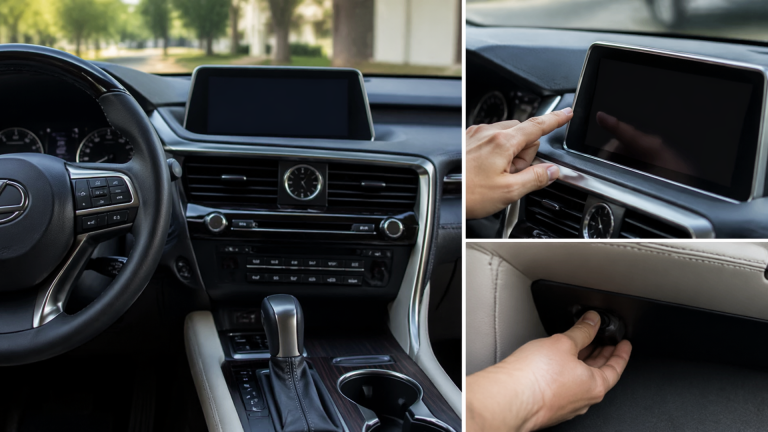
How to Deactivate or Turn Off the VSC Light on a Lexus RX 350
If the VSC (Vehicle Stability Control) light is illuminated on your Lexus RX 350 and you want to turn it off, it usually means the system has been manually disabled or is actively engaged to help maintain traction. For most models, you can turn off the VSC by pressing and holding the “VSC OFF” button, typically found on the dashboard to the left of the steering wheel, for about three seconds until the indicator light on your instrument panel turns off. This action temporarily deactivates the Vehicle Stability Control, which is sometimes useful for specific driving situations.
When Deactivating VSC Is Recommended
The Vehicle Stability Control (VSC) system is a vital safety feature designed to prevent skidding and loss of control, particularly during sharp turns or sudden evasive maneuvers. It operates by applying individual wheel brakes and reducing engine power when it detects a loss of steering control. While highly beneficial for everyday driving, there are specific scenarios where temporarily disabling VSC can be advantageous, usually when you need to allow for more wheel slip:
- Driving in deep snow, mud, or sand: VSC can sometimes hinder forward progress in these conditions by limiting engine power or braking. Disabling it allows for necessary wheel spin to gain traction.
- Towing on slippery surfaces: When maneuvering a heavy load on slick roads, VSC might intervene more than desired.
- Performance driving on a closed course: Experienced drivers on a track might disable VSC for greater control over the vehicle’s dynamics.
Remember, VSC is a safety system. Only deactivate it when you understand the associated risks and have a clear reason. The system typically re-engages automatically once a certain speed is reached or the vehicle is restarted.
Steps to Turn Off VSC on Your Lexus RX 350
The procedure to deactivate the VSC system on most Lexus RX 350 models is straightforward and can be done while the vehicle is stationary or moving.
1. Locate the VSC OFF Button: Find the button labeled “VSC OFF” on the lower dashboard panel, usually to the left of the steering column, often near other driver controls.
2. Press and Hold: Depress and hold the “VSC OFF” button for approximately three seconds.
3. Check the Dashboard: You should see the “VSC OFF” indicator light illuminate on your instrument panel, confirming the system is deactivated. The main VSC warning light may also illuminate or flash depending on your specific model.
To reactivate the VSC system, simply press the “VSC OFF” button again. The “VSC OFF” indicator will extinguish, and the VSC system will be active once more.
What to Do If the VSC Light Stays On
If the VSC light remains illuminated on your Lexus RX 350 even after you’ve attempted to turn it off, or if it appears unexpectedly and won’t go away, it likely indicates an underlying issue. This could be a fault within the VSC system itself, or it might be related to other critical vehicle systems that VSC relies on, such as the Anti-lock Braking System (ABS) or the steering angle sensor.
Common Reasons for a Persistent VSC Light
- Low Tire Pressure: Significantly low tire pressure in one or more tires can sometimes trigger the VSC warning light.
- Faulty Wheel Speed Sensor: These sensors are crucial for both ABS and VSC. If one malfunctions, the entire system may shut down.
- ABS System Issues: Since VSC utilizes ABS components, a problem with the ABS itself will commonly cause the VSC light to illuminate.
- Steering Angle Sensor Malfunction: This sensor informs the VSC system about the driver’s steering input.
- Traction Control System Fault: A problem specific to the traction control component of the VSC system.
Next Steps to Resolve the Issue
1. Verify Tire Pressure: Ensure all tires are inflated to the manufacturer’s recommended pressure, which is usually found on a sticker inside the driver’s side doorjamb.
2. Restart the Vehicle: Sometimes, a simple engine restart can clear minor electronic glitches. Turn the engine off completely, wait about a minute, and then start it again.
3. Drive at Moderate Speed: For many Lexus models, the VSC system will automatically re-engage if you drive above a certain speed (often around 25-30 mph). If the light was on because the system was actively working, it might turn off after you reach this speed and drive for a short distance.
When to Seek Professional Assistance
If the VSC light persists after you’ve completed the above checks, or if it’s accompanied by other warning lights such as the ABS light or a general check engine light, it’s advisable to have your Lexus RX 350 inspected by a qualified mechanic or a Lexus dealership. They possess the specialized diagnostic tools necessary to read error codes from your vehicle’s computer and accurately identify the root cause of the problem. Continuing to drive with a potentially faulty VSC system means you will not have the benefit of electronic stability control, which could be a safety concern, particularly in challenging driving conditions.

Greedy Wheels is the founder and lead editor at Wheels Greed. With over 15 years of hands-on automotive experience — from rebuilding engines in a home garage to managing fleet maintenance for a regional logistics company — he brings real-world mechanical knowledge to every guide.
His work has been featured in automotive forums, owner communities, and dealership training materials. When he’s not researching the latest car owner questions, you’ll find him at a local track day, wrenching on his project car, or testing the newest OBD2 diagnostic tools.
At Wheels Greed, every article is reviewed against manufacturer service manuals, NHTSA bulletins, and verified owner reports. No AI-generated fluff. No guesswork. Just practical answers from someone who has turned the wrench.