Ford Backup Camera Not Working Quick Fixes before Dealer Visit
If your Ford backup camera isn’t displaying an image or is showing a blank screen, don’t immediately assume a costly repair. Often, a few simple checks can resolve the issue. This guide covers common quick fixes for a Ford backup camera not working, helping you troubleshoot before you need to visit a dealership.
Quick Checks for a Ford Backup Camera Not Working
Before diving into more complex diagnostics, perform these basic checks. They are the most common culprits for a malfunctioning backup camera.
- Check for Obstructions: Ensure the camera lens itself is clean. Dirt, mud, snow, or ice can obscure the view. Gently wipe the lens with a soft, damp cloth. Also, check if anything is physically blocking the camera’s view from the outside, like a license plate frame that’s too large or a trailer hitch.
- Why it matters: A simple physical blockage is the easiest and most frequent reason for a camera to stop working.
- Fix: Clean the lens thoroughly and check for external obstructions.
- Verify Camera Activation: Confirm that the camera is actually being activated. This typically happens when you shift into reverse. On some Ford models, there might be a specific button or setting to manually activate the camera.
- Why it matters: The system might be functioning correctly, but not being triggered as expected.
- Fix: Shift into reverse and listen for any system sounds. Check your owner’s manual for specific activation procedures for your model.
- Inspect Fuses: A blown fuse is a common electrical issue that can disable various vehicle components, including the backup camera.
- Why it matters: Fuses protect electrical circuits from overcurrent. If a fuse blows, the circuit it protects will stop functioning.
- Fix: Consult your owner’s manual to locate the fuse box(es) and identify the fuse(s) associated with the backup camera or infotainment system. Visually inspect the fuse; if the metal filament inside is broken, replace it with a new fuse of the same amperage.
Troubleshooting Your Ford Backup Camera System
If the quick checks don’t resolve the problem, it’s time to explore deeper troubleshooting steps.
Resetting the Infotainment System
The vehicle’s infotainment system often controls the backup camera display. A simple reboot can sometimes clear temporary glitches.
- Mistake: Ignoring potential software glitches within the infotainment system.
- Why it matters: Software can sometimes freeze or encounter minor errors, leading to features like the backup camera not working correctly.
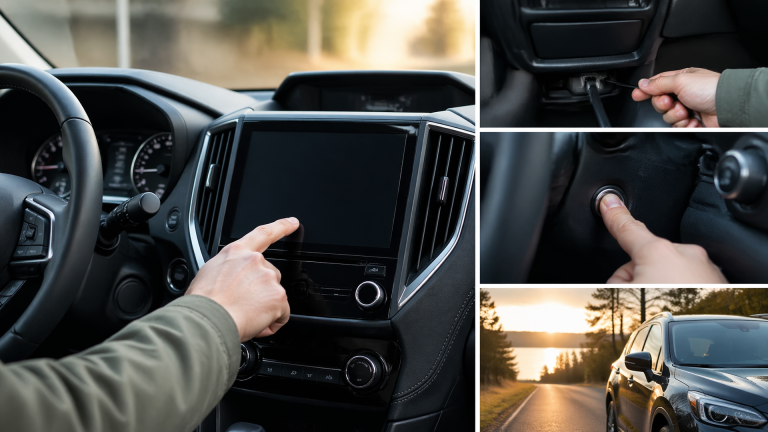
- Fix: Turn off the vehicle completely, remove the key from the ignition, and open and close the driver’s door to ensure all modules power down. Wait for about 5-10 minutes, then restart the vehicle and test the camera. For some models, a more specific infotainment system reset procedure might be outlined in the owner’s manual (e.g., holding down specific buttons).
Checking Wiring and Connections
The backup camera system relies on wiring that runs from the camera, often through the tailgate or rear bumper, to the display unit. Damage or loose connections can interrupt the signal.
- Mistake: Assuming wiring is intact without visual inspection, especially after a minor impact or if the vehicle has a trailer hitch installed.
- Why it matters: Damaged or disconnected wires are a direct cause of signal loss to the camera.
- Fix: Visually inspect the wiring harness connected to the camera, typically located near the license plate or tailgate. Check for any signs of fraying, pinching, or corrosion. If you have a trailer hitch, ensure the camera wiring isn’t snagged or damaged by it. For a more thorough check, you might need to access panels in the rear of the vehicle, which can be complex.
Examining the Camera Module
The camera itself can fail due to internal damage or water ingress.
- Mistake: Not considering the camera module as a potential point of failure.
- Why it matters: The camera is a piece of hardware that can become damaged or defective over time.
- Fix: While direct replacement is often a dealer task, you can sometimes visually inspect the camera housing for cracks or signs of water intrusion. If the lens is fogged internally, it indicates a seal failure.
When to Visit the Dealership
If you’ve gone through the above troubleshooting steps and your Ford backup camera is still not working, it’s likely time to consult a professional.
- Complex Electrical Issues: Problems with the control modules, persistent blown fuses, or internal wiring faults often require specialized diagnostic tools and expertise.
- Hardware Failure: If the camera module itself is confirmed to be faulty, it will need to be replaced.
- System Integration Problems: The backup camera is integrated with the vehicle’s complex electronic systems. Issues with the infotainment unit or other related modules may require dealer-level diagnostics.
Why it matters: Attempting repairs beyond your comfort level can lead to further damage or safety concerns. Dealership technicians have the specific knowledge and equipment for your Ford model.
Fix: Schedule an appointment with your local Ford dealership to have the backup camera system professionally diagnosed and repaired.

Greedy Wheels is the founder and lead editor at Wheels Greed. With over 15 years of hands-on automotive experience — from rebuilding engines in a home garage to managing fleet maintenance for a regional logistics company — he brings real-world mechanical knowledge to every guide.
His work has been featured in automotive forums, owner communities, and dealership training materials. When he’s not researching the latest car owner questions, you’ll find him at a local track day, wrenching on his project car, or testing the newest OBD2 diagnostic tools.
At Wheels Greed, every article is reviewed against manufacturer service manuals, NHTSA bulletins, and verified owner reports. No AI-generated fluff. No guesswork. Just practical answers from someone who has turned the wrench.